Using Spreadsheets for Data Management
Free to teach as-is — the teacher guide, student handout, and slides are included.
Free — we'll email you an access link. Google Docs format.
Objective
I can create a spreadsheet to organize and analyze data using basic functions like sum and average.
Part 1 of 3
Warm-up video
Unknown Channel · 5:00
We don't generate video — this one is by Unknown Channel on YouTube. The practice questions and exit ticket below were drafted by AI for this objective, and every question is editable in the teacher guide.
Part 2 of 3
Practice
5 questions
What is the primary function of Microsoft Excel, and how does it differ from Microsoft Access in terms of data management?
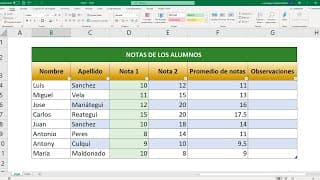
Describe how you would use the SUM function in Excel to calculate the total of a list of expenses. Provide an example of how the data might be organized in the spreadsheet.
Part 3 of 3
Exit ticket
Quick comprehension check
“You have a spreadsheet that lists your weekly expenses: $50 for groceries, $30 for transportation, and $20 for entertainment. Use the SUM function to calculate your total expenses for the week. Show how you would set up the data in the spreadsheet. In a spreadsheet, you recorded the scores of five tests: 85, 90, 78, 92, and 88. Use the AVERAGE function to find the average score. Describe how you would organize the data in the spreadsheet and the formula you would use.”
Sample answer included in the free materials
Get the materials
Teacher guide, student handout, and slides — free, in Google Docs format
Teacher Guide
Complete lesson plan with answer keys and alternate activities
Student Handout
Printable worksheet
Slides
Ready to present
We'll ask for your email to send your access link — nothing else.
Teaching a group at a different level?
Where are your students right now? We'll rebuild this lesson to match — including the teacher guide, student handout, and slides, saved to your Google Drive.
Adapt This Lesson